KreaProducts for Dolibarr ERP/CRM
KreaProducts is an advanced product management module for the Dolibarr ERP/CRM. It extends the Products module with nutrition, allergens, BOM/Technical Sheets, inventory, and cost/stock automations – built for hospitality and retail operations that need consistency, traceability, and accurate food cost.
- Module
- KreaProducts
- Version
- 2.0.98
- Editor
- Kreativität Works
- License
- GPL v3 or proprietary license (contact us)
- Support
- [email protected]
- Website
- kreativitat.com
- Demo site
- dolibarr.kreativitat.com
- Demo login
- User: demo · Password: demo12345678
Features
Nutrition and allergens
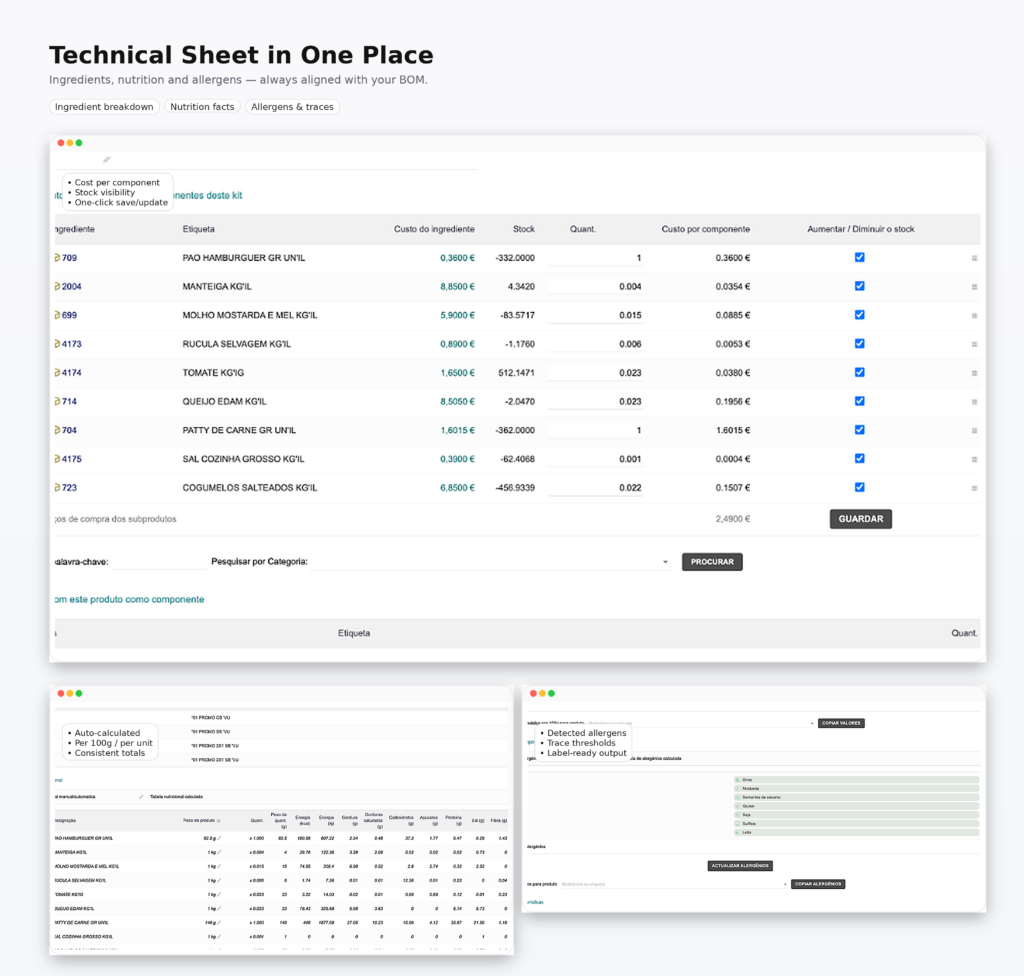
- Nutritional table with automatic calculation, validation, and updates.
- Nutrient propagation between parent/child products, including BOM (MRP) when enabled.
- Allergen management with propagation by percentage of total weight and trace marking.
- Support for non-food products (excluded from calculation).
Product structure and BOM
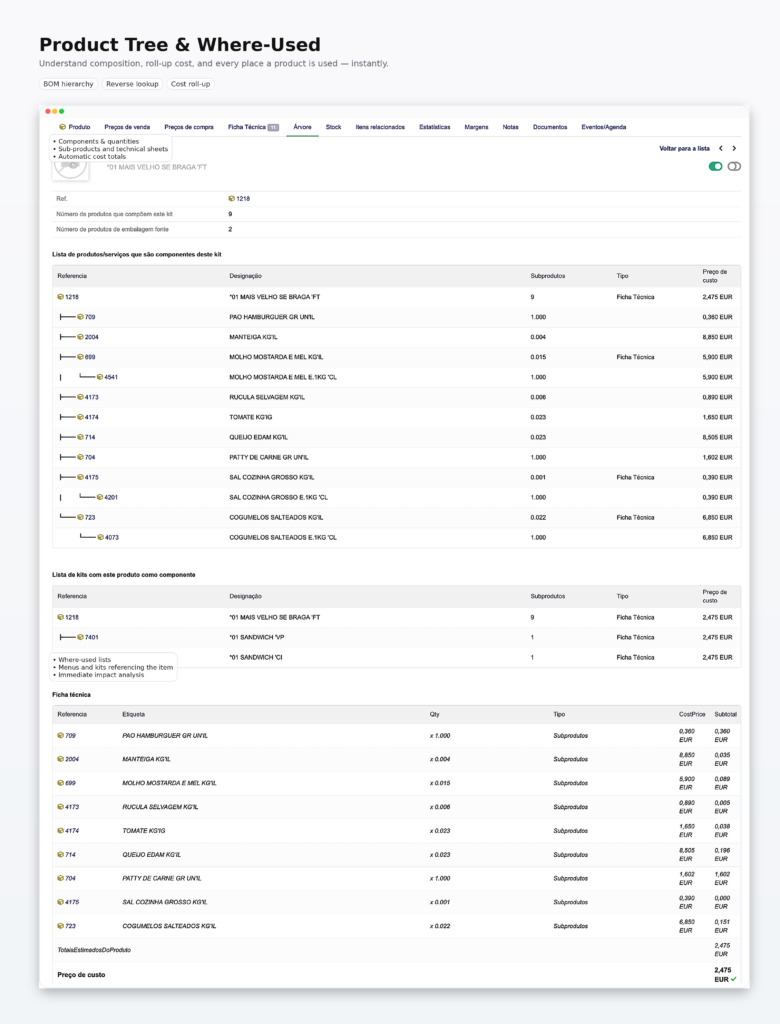
- Complete product tree (associations + BOM/MRP, when enabled), with hierarchical navigation.
- Detailed view of product composition (components, quantities, and subproducts), with cost price totals.
- Clear identification of relationships between products and technical sheets, including source packages when applicable.
- Reverse view (where used): list of kits/technical sheets and menus where the item is used as a component, enabling the impact analysis of cost changes, substitutions, and raw-material normalization.
- Dismantling BOM with origin and relationships visible on the technical sheet.
- Automatic cascading cost recalculation based on components/technical sheets.
- Nested BOM support (BOM lines referencing another BOM), with correct propagation of costs, nutrition, and allergens.
- Multicompany: shared BOMs (entity=0) are available across entities, with priority given to the current entity BOM when it exists.
- Dismantling is enabled per product via the
kreap_dismantleextra field.
Correct stock and inventory dates (invoice date and value date)
By default, Dolibarr records many movements on the date the document is posted/validated in the system – which may not match operational reality. In environments with frequent purchasing, this difference creates deviations and noise in stock analysis.
KreaProducts addresses this limitation with two essential automations:
- Stock entry by invoice date (suppliers): products are posted to stock with the invoice date/receipt date, instead of the date the document is entered in Dolibarr.
- Inventory by value date (backdated): inventory adjustment is applied based on the inventory date (value date), not the validation date.
- Inventory anchored to counted stock: recalculation uses the counted quantity (qty_stock) when available, falling back to qty_view only when needed.
Smart packaging and unit cost management (automatic dismantling)
In hospitality, it is common to buy the same item in different packages – but for food cost what matters is the real unit cost (e.g., EUR/L, EUR/kg, EUR/unit).
Typical example: oil. It can be purchased in 10L, 5L, 1L canisters or 12x1L cases. If these packages enter the system as “different products”, inconsistencies in stock and unit cost quickly appear.
KreaProducts solves this using Dolibarr’s BOM module (Bills of Materials / Material Sheet – FM):
- Configure a material sheet for the package (e.g., 10L canister), defining the conversion to the unit product (e.g., 10x 1L).
- Whenever a purchase of one of these packages is recorded, the system performs automatic dismantling to the unit product, without user intervention.
This process:
- creates the corresponding stock movements,
- keeps the proportional cost and traceability (origin -> destination),
- and ensures the unit product is ready for use in recipes, inventory, and margin calculations.
Automatic cost and food cost updates (cascade)
KreaProducts also automates cost price and food cost updates for finished products, based on their technical sheets (BOM/FM).
In practice:
- if a component (e.g., oil) has its purchase price updated,
- all products that use that component (e.g., french fries) have their cost recalculated automatically,
- ensuring that food cost and margins always reflect reality, without manual adjustments.
Productivity and lists
- Simplified product list with an option to hide items.
- Price simulator (Metrics and Markup) with test markup.
- Stock movement list by product shows total stock.
Requirements
- Dolibarr >= 19
- PHP >= 7.0
- Required modules: Products, Stock, Suppliers, BOM/MRP
- Optional: Lots (productbatch)
Installation
- Copy the module to
custom/kreaproducts. - Enable it in Configuration -> Modules/Applications -> KreaProducts.
- Adjust the options on the configuration page.
- If needed, import the scripts in
sql/.
Configuration (main constants)
| Constant | Description |
|---|---|
KREAPRODUCTS_DEFAULT_WEIGHT_LABEL | Unit class for weight. |
KREAPRODUCTS_NUTRITIONAL_TABLE_TAB | Show the nutritional table in the technical sheet tab. |
KREAPRODUCTS_ENABLE_COPY_AVG_TO_PRODUCT | Show the selector and button to copy average values per 100g. |
KREAPRODUCTS_ENABLE_COPY_ALLERGENS_TO_PRODUCT | Show the selector and button to copy allergens to another product. |
KREAPRODUCTS_AUTO_SYNCH_BUY_PRICE | Automatically propagate cost price (cascade recalculation). |
KREAPRODUCTS_ALLERGEN_FULL_THRESHOLD_PCT | Percentage of total weight to consider allergens present. |
KREAPRODUCTS_ALLERGEN_TRACE_THRESHOLD_PCT | Percentage of total weight to mark allergens as traces. |
KREAPRODUCTS_STOCK_MOVEMENT_DATA | Use invoice date for stock movements. |
KREAPRODUCTS_SUPPLIER_MOVE_TIME | Time applied to supplier invoice movements. |
KREAPRODUCTS_INVENTORY_DEFAULT_TIME | Default time when creating inventory. |
KREAPRODUCTS_INVENTORY_CATEGORY_ROOT | Root category for inventory selection. |
KREAPRODUCTS_DISMANTLE_BOMTYPE | BOM type used for dismantling. |
KREAPRODUCTS_DISMANTLE_WAREHOUSE | Warehouse for dismantling movements. |
KREAPRODUCTS_SIM_ENABLE | Enable the price simulator. |
KREAPRODUCTS_SIM_DEFAULT_MARKUP | Default simulator markup. |
KREAPRODUCTS_REPLACE_PRODUCT_LIST | Replace the standard product list. |
KREAPRODUCTS_DEBUG_LOG | Enable KreaProducts debug logs. |
Note: allergen thresholds are percentages of the total recipe weight of the final product.
Permissions
- Nutrition: read, write, delete.
- Allergens: read, write, delete.
- Inventory: view expected values.
License
- GPL-3.0-or-later (see LICENSE and COPYING).
- Proprietary license available for commercial use or closed-source code; contact [email protected].
Support and contributions
- GitHub: https://github.com/kreativitat
- Website: https://www.kreativitat.com
Disclaimer
Nutrition and allergen data is entered by the user or derived from their inputs and is not verified. It is provided for informational purposes only and does not constitute medical, dietary, or regulatory advice. The user is solely responsible for accuracy, labeling, and compliance with applicable laws. This module is provided “as is”, without warranties of any kind, express or implied, including merchantability and fitness for a particular purpose. To the maximum extent permitted by law, the authors and distributors are not liable for any direct or indirect damages arising from the use of the data or the software.